How to use Kohana 3 validation (with forms)
Update: I am gradually updating my Kohana 3.0 articles to Kohana 3.1.
Overview of Kohana 3 validation
Validation is done using the Validation class, or via ORMThe steps in validating a form are:
- Initialize the Validation class.
- Call Validate->check() and check whether the validation succeeded.
- If the validation failed, call errors($file) to get the error messages.
- Display the validation errors in the correct context on the form.
Initializing the Validation class
In Kohana 3.1, the Validation class is simply initialized by setting up rules. The class has also changed from Validate (KO 3.0) to Validation (KO 3.1).Rules. The Validation class has a nice set of basic validation rules, including rules for email addresses, credit cards, URLs and regexps.
KO 3.0 migration notes
KO 3.1 validation no longer has callbacks or filters. Callbacks have been merged into rules, while filters have been removed altogether.
Filters were used to do things like trim() the input in KO 3.0.x - you can do array_map($array, 'trim').
Callbacks are now specified using the rule() function, see this excellent tutorial from Lysender for the details!
Some sample code
// Create a validation object
$validation = Validation::factory(
   array(
    'email' => '[email protected]',
    'name' => 'Test'
    );
// Add some basic rules
$validation->rule('name', 'not_empty');
$validation->rule('email', 'email');
// Check the result
$validation->check();

// Using a single Kohana_Valid::rule
// for just checking a single field
if(Valid::email('[email protected]')) {
   // do something with the email
}
Retrieving and customizing error messages
Validation can be done for both models (on save) and various other forms. Because of this the messages are stored in separate, reusable files. You should put your message files under /application/messages/filename.php.
I think the logic behind this has gotten a bit more complicated for KO 3.1 - in particularly with validation messages from the ORM... have to get back to you on that.
The files look like this:
array(
'username' => array(
   'username_available' => 'This username is already...',
   'not_empty' => 'Username must not be empty.',
   'invalid' => 'Password or username is incorrect.',
),
'password' => array(
   'matches' => 'The password and password confirmation ..',
   'range' => ':field must be within the range of :param1 to :param2',
),
);
Each field is a sub-array and each rule has it's own field. Note that you can use :field to specify the field name.
To retrieve the messages, use $validate->errors($file) where $file is the filename (no extension).
The return value looks something like:
array(
   'password' => 'password must be less than 42 characters long',
   'password_confirm' => 'The password and password confirmation are different.',
   'username' => 'This username is already registered, please choose another one.',
   'email' => 'This email address is already in use.');
The simplest way to show these is the just print them in as a list. However, I will show one way to show these messages in context on the actual form.
Displaying validation errors in context on the form
Here is how we want to show the forms: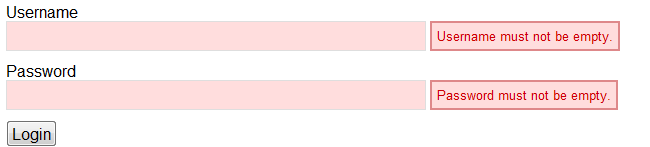
To accomplish this, I have created a new Appform helper which uses the Form class, but wraps its input with application-specific markup for errors.
The basic idea is that you can pass default values, form values and error messages to Appform prior to outputting the fields. It will then create the contextual markup for each of the fields. I have maintained compatibility with the Form API, with additional properties for added functionality.
Note: for Kohana 3.1, you need to move the error messages from _external to the base for Appform to work.
$errors = $e->errors('register');
$errors = array_merge($errors, (isset($errors['_external']) ? $errors['_external'] : array()));
$view->set('errors', $errors);
As a side note, I think this is exactly how the division of labor between framework and application developer should be: the framework should not impose a particular markup on the developer, but to keep application-specific code shorter, the developer should be able to create an extended version of the Form helper for the basic form layout. There are too many different preferred styles of markup, and the framework should not try to guess how you like your forms but rather provide the backend. Kohana gets this right.
Here is how a sample invocation would look like (note that the Appform class is not static, since each form has its own contextual data):
$form = new Appform();
if(isset($defaults)) {
  $form->defaults = $defaults;
}
if(isset($errors)) {
  $form->errors = $errors;
}
if(isset($values)) {
  $form->values = $values;
}
echo $form->open('user/login');
echo '<ul>';
echo '<li>'.$form->label('username', ('Username')).'</li>';
echo $form->input('username', NULL, array('info' => ('You can also log in using your email address instead of your username.')));
echo '<li>'.$form->label('password', ('Password')).'</li>';
echo $form->input('password');
echo '</ul>';
echo $form->submit(NULL, ('Login'));
echo $form->close();
You can download my form validation helper from Bitbucket. It's only a couple of hundred lines so it is easy to improve - a useful start for building more complex functionality for your app and also to reduce the lines of code needed for each form.
ORM and form validation (still need to update to KO 3.1)
The Kohana ORM provides support for field validation. However, it is very much oriented towards each model having one set of validations. With ORM, the function calls are:if ( !empty($_POST) && is_numeric($id) ) {
$model = ORM::factory('user', $id); // create
$model->values($_POST); // load values to model
// check() initializes $model->_validate with a Validation object containing the
// rules, filters and callbacks from Model_User (e.g. $_rules, $_callbacks..)
if ($model->check()) {
$model->save(); // save the model
} else {
// Load errors. The first param is the path to the
// message file (e.g. /messages/register.php)
$content->errors = $user->validate()->errors('register');
}
}You may want to do something different, either using a different set of rules or a different set of features! The classic example is user profile editing, where you do not want to force the user to re-enter their password - so you need to exclude the password rules from the Validation check.
Comments
NARKOZ: There are no filters in Kohana 3.1
Palkonyves: Yep, but you can get the same functionality with own callback as rule e.g.: function trim(&$value){ $value = trim($value); } $val->rule('name', 'trim', array(':value'));
my problem with it in kohana 3.2 that I cannot get back the validated array from the Validation object on which I used several callbacks.
I would like something like: if( $validation->check() ){ $validation->getValidatedData(); }
any idea how to do this without changing this core class?